Running a grammar correction model inside an iPhone keyboard
I’m building Mochi, a keyboard for iPhone that fixes your grammar as you type, in any app. The grammar check is a small model I trained, and it runs on the phone, with no server.
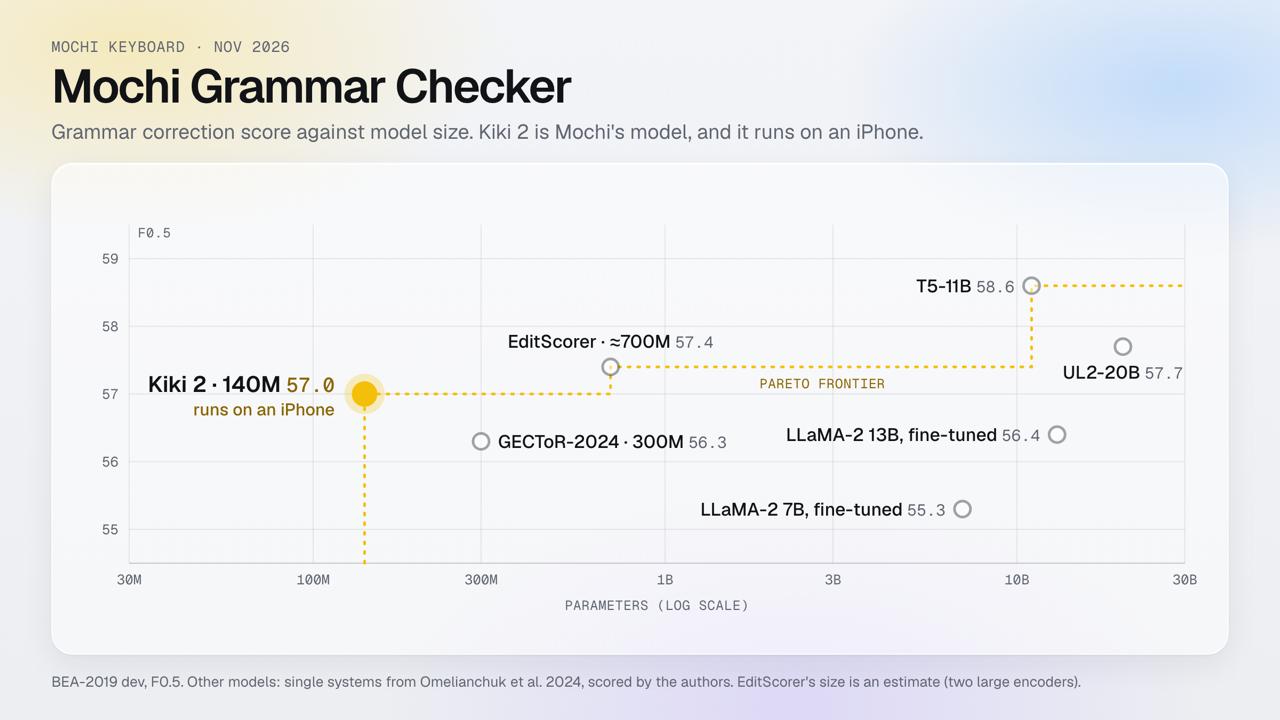
For months that model was stuck at 42.5 on the standard grammar correction benchmark. In November it got to 57.0, in the same range as GECToR-20241, a model 2.6 times bigger, and it checks a sentence in about 0.2 seconds on an iPhone 14.
Part 1, from January, is how this started. Here’s how it got from 42.5 to 57, but first, let me tell you why it has to run on the phone.
Why not the cloud
The whole point is running the model inside the iPhone, and especially inside the keyboard, with no cloud. With SaaS and with AI there’s a huge dependency on the cloud. But phones are ridiculously powerful, more so every year. Sending everything to a server has become the cliché of every service, and most of the time nobody stops to check if there’s a better way.
The cloud is also a way to hook users. You make them create an account, they’re stuck in your service, and the problem looks so complex that only a server could solve it. A phone can solve it just fine.
And some people just want to own their tools. A keyboard sees everything you type. I’d rather have that tool live on my phone than rent it from a big company that can change the terms or shut it down. Mochi doesn’t need an account to work, and it also works in airplane mode, or on the Brooklyn subway, like my friend Martín, who says there’s no signal down there.
That’s why I made Mochi. I want to compete with Grammarly with a small keyboard that lets you write in any app. It’s what I’m doing with all my apps: small models running on the phone, doing things you don’t expect a phone to do, or at least things that usually get solved in the cloud. In the end you do expect them; what changes is doing them right on the device. Spellforge fixes spelling inside Fonts Pro, Luni reads text aloud with on-device voices, and Lunara guides meditations with a voice that runs on the iPhone.
Spelling first, then grammar
I’ve wanted to build a keyboard that fixes grammar and spelling for years. I was obsessed with training models for a long time, and I had to drop it more than once.
The truth is I don’t have a machine learning background. I learned as I went, with more intuition than mathematical rigor. The LLM era, especially since 2025, changed the game (more on that later).
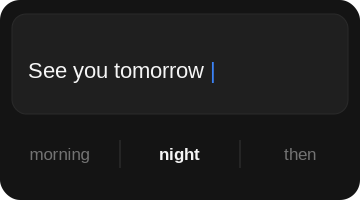
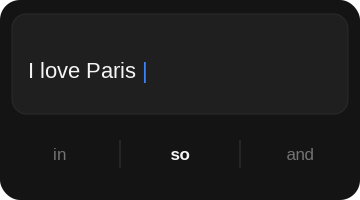
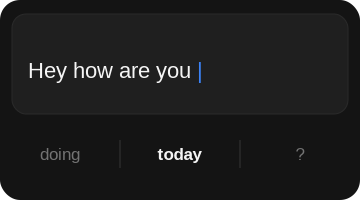
In 2025 I finally shipped Spellforge, a spell checker built on a ranker-style transformer, in my Fonts Pro keyboard. It fixes words as you type, gives suggestions, predicts the next word, capitalizes where it should, and splits words you typed together. It fixes the typos and finishes the last word on the way, so “howareyo” becomes “how are you”.


Grammar is way harder
With that milestone done, the new obsession, or question, was: could a grammar checker run without the cloud? A model that fits inside a keyboard.
iOS gives a keyboard about 77 MB of memory on an iPhone 14 and about 177 MB on an iPhone 16. When I started it was a bit worse, I think around 54 MB.
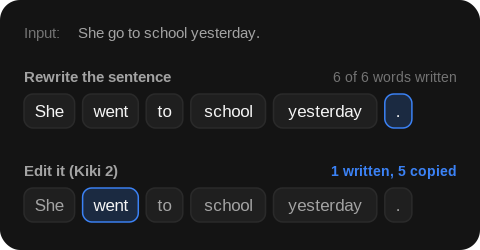
And grammar is a different beast. Spelling can be fixed pretty well word by word, but to fix grammar you have to understand the whole sentence. In “She go to school yesterday” the mistake is in “go”, but what says it has to be “went” is “yesterday”, three words later. Doing that with rules doesn’t scale: every rule has exceptions, and the exceptions have exceptions. It takes a certain level of intelligence, and you can’t write that by hand.
TITO (based on BERT)
With Claude Opus 4.5, I tried everything I could find. The first models started way low, in the 20s. The first one that got anywhere was TITO, a small model that learned by copying a much bigger one. TITO got its name because it’s a BERT-style model. That family already has people’s names, BERT and RoBERTa, and mine was a small one, so it became ROBERTITO (“little Robert” in Spanish), and TITO for short. Then Kiki 1, TITO with a decoder on top, reached 42.5. I couldn’t get past that for months.
(I tried a ton of models, straight from the papers: diffusion on Qwen3-0.6B, SEDD, CDLM, a GECToR-style tagger on ModernBERT, a lattice model, LoRA on Qwen3-0.6B. SEDD and CDLM both spat out garbage. The worst was TRM2, a tiny recursive model that was supposed to beat LLMs on some tasks. For GEC it never got past 23 and went nowhere.)
With a little help from my friends
In mid-November I picked the training back up, now with Claude Opus 5.5 (I barely used Fable 5.2). As you may know, models like Opus 5.5 took a big jump, and that changes how I work: I can build fast and pick old projects back up without the tedious part. We changed three things:
-
A model that edits instead of rewriting: it marks which words to change and proposes the change, instead of writing the whole sentence again.
-
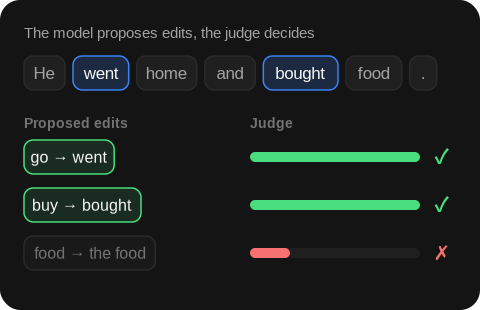
A judge: a small model that decides which of the proposed edits to apply. That’s the idea behind the systems that beat the single models on the leaderboard.
-
More layers: from 9 to 14 to 22. Every jump added 1 to 2 points.
That got us to a whopping 56.9 F0.5 on BEA-2019 dev, and 57.0 with the same model running in Swift on the phone.
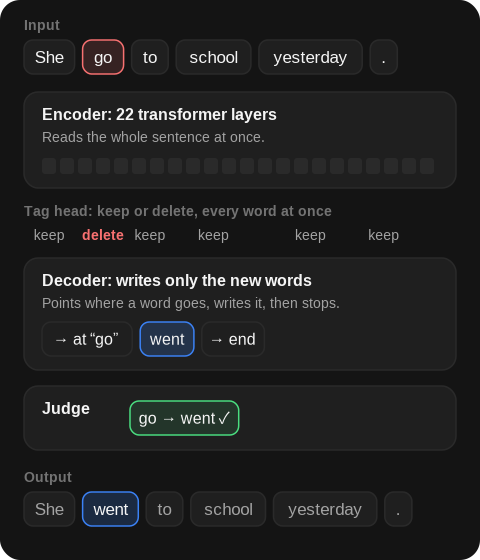
That 22-layer model is Kiki 2. Here’s what it does with a sentence. The encoder, 22 transformer layers, reads the whole sentence at once. A tag head marks every word to keep or delete. Then a small decoder, a single transformer layer, writes only the new words: it points at where a word goes, writes it, and stops when there’s nothing left to add. Every word that stays is copied as it was, so the model can’t swap a name or a rare word by accident, and a sentence with no mistakes costs one decoder step. Last, the judge decides which edits to apply.
Past 22 layers, the diminishing returns start to show and it stops making sense, mostly because the model gets much heavier.
None of this needed a big cluster. I used a rented RTX 5090: the 14-layer model took 15 hours (about $10), and Kiki 2 took 21 hours (about $15).
I also tried an ensemble: Kiki 2 and four other models of mine voting on every edit got to 59.2, above T5-11B, the best single model on the chart (58.6). But running five models for every sentence is way too heavy for a keyboard. Kiki 2 on its own is more than enough: T5-11B beats it by 1.6 points and is 80 times bigger, and the ensembles at the top of the benchmark (around 63) run several big models at once.
| January to October 2026 | November 2026 | |
|---|---|---|
| Best model | Kiki 1, ~97M parameters | Kiki 2, 135.7M parameters |
| BEA-2019 dev F0.5 (official scorer) | 42.5 | 57.0 |
| On the phone | no | about 200 ms per sentence on an iPhone 14 |
One thing about that 57: BEA-2019 dev has one reference correction per sentence, so if the model fixes a sentence in a different but correct way, the benchmark counts it as a mistake. By the benchmark, Kiki 2’s precision is 62.5%. I read 80 of the edits it called wrong, and about 65% of them were fine. A blind reader (Sonnet) accepted 92% of 300 of them, with 100 edits the reference agreed with mixed in as a control. So the real precision is somewhere between 87% and 97%.3 On 600 real messages it was 94%.
What didn’t work
Most of what I tried in November didn’t move the score, and some of it looked great on paper:
- Running the same layers twice. The ALBERT trick4: repeat some of the layers to get more depth for free, with the same download size. It gave nothing and made every sentence 7 to 14% slower. Real pretrained layers were the only depth that paid.
- A second round of corrections. Feed the corrected sentence back in and let the model fix it again, like GECToR does. Only 18% of the second-round edits were right.
- An ensemble of copies. Six copies of the same model voting on each edit added 0.4. They make the same mistakes, so they agree on the wrong things too.
- A judge that reads the corrected sentence. It looked better on held-out data and then gave nothing on the benchmark.
- More candidates for the judge. Giving it the edit head’s second and third choices cost 1.7 points.
- A stricter confidence cut-off for fluent writers. Even cheating, knowing each writer’s level and tuning on the test set, it only added 0.5.
- Letting an LLM edit the weights by hand. I tried the “weight-space programming”5 idea, and it never beat the untouched model. An edit can remove something that hides an ability, but it can’t add one, and what my model lacks is spotting the errors in the first place.
- 6-bit weights. I lost 7 points, because the model stops proposing edits. 8-bit cost nothing, so the phone runs 8-bit.
What it looks like in Mochi
You type as usual. When you finish a sentence, or pause, Mochi checks it in the background. If it finds something, a row shows up above the keyboard with the changes, like “go → went”, and a Fix button. Tap it and the sentence gets fixed right where you typed it. If you change your mind, Undo stays there for a few seconds.
It’s fast enough that the fix is there before you reach for Send: about 200 ms per English sentence on an iPhone 14, and about 100 ms for Spanish. Most of the wait you see in the video is on purpose. Mochi waits for a half-second pause before it checks, so it doesn’t jump in while you’re still typing.
Other languages
Mochi doesn’t only fix English. Spanish is my first language, and I wanted a keyboard for my own use that fixes grammar in Spanish too. On the same base model we built grammar checkers for Spanish, Portuguese and German, and more languages are coming. I’m still training the Spanish one, because there aren’t nearly as many good datasets as in English. All three will be in the first beta, together with English.
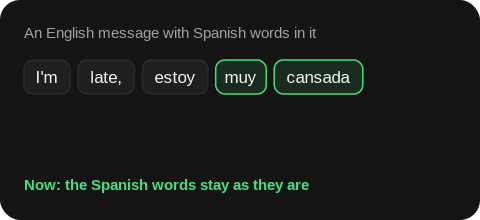
Messages that mix languages were their own problem. In an English message with Spanish words in it, an English-only check “fixes” them: “muy” became “my” and “cansada” became “Canada”. Now the words from your other language stay as they are.
Spellforge is on version 2 now. It corrects much better, and in 10 languages: English, Spanish, French, German, Italian, Portuguese, Dutch, Swedish, Danish and Norwegian. You can also type by swiping.
What’s a Mochi?
Mochi are Japanese sweets, and if you put little eyes on one, it turns into an ultra super cute little creature. My daughters liked it, and it stuck.



Coming to the App Store
I have a lot more ideas to test and a lot more languages to add, but it all depends on whether people want this. I’m submitting Mochi to the App Store now. If you want me to let you know when it’s out, leave your email below, or pass this on to someone who could use it. And if you tell me what you’d use it for, even better: there’s a box for that too.
Notes (5)
-
GECToR-2024 (a RoBERTa-Large tagger), T5-11B and the other models on the chart are single systems from Kostiantyn Omelianchuk et al., Pillars of Grammatical Error Correction, 2024 (arXiv:2404.14914), scored on BEA-2019 dev by the authors. ↩
-
Alexia Jolicoeur-Martineau, Less is More: Recursive Reasoning with Tiny Networks, 2025 (arXiv:2510.04871). It’s a 7M-parameter network that scores higher than most LLMs on the ARC-AGI puzzles. ↩
-
Kiki 2 makes 4,623 edits on BEA-2019 dev, and the benchmark counts 2,888 of them as right (62.5%). The other 1,735 are the “wrong” ones I checked. If 65% of them are fine, as in my own reading of 80, precision is 87%. If 92% are, as the blind reader said of 300, it’s 97%. The reader rejected none of the 100 control edits and was lenient, so the two readings bracket the real number. ↩
-
Zhenzhong Lan et al., ALBERT: A Lite BERT for Self-supervised Learning of Language Representations, 2019 (arXiv:1909.11942). ALBERT uses the same weights in all its layers. ↩
-
Rikiya Takehi et al. (MIT CSAIL), Sparks of Weight-Space Programming: LLMs can natively read & write neural network weights, 2026 (blog post). ↩